Knowledge Sphere: turning a cabinet of documents into a knowledge base that answers questions
Every research team and professional institution sits on a mountain of documents — reports, papers, manuals, contracts. But once knowledge is written into a PDF it is effectively sealed: finding an answer means flipping through file after file, page after page, relying on memory and keyword luck.
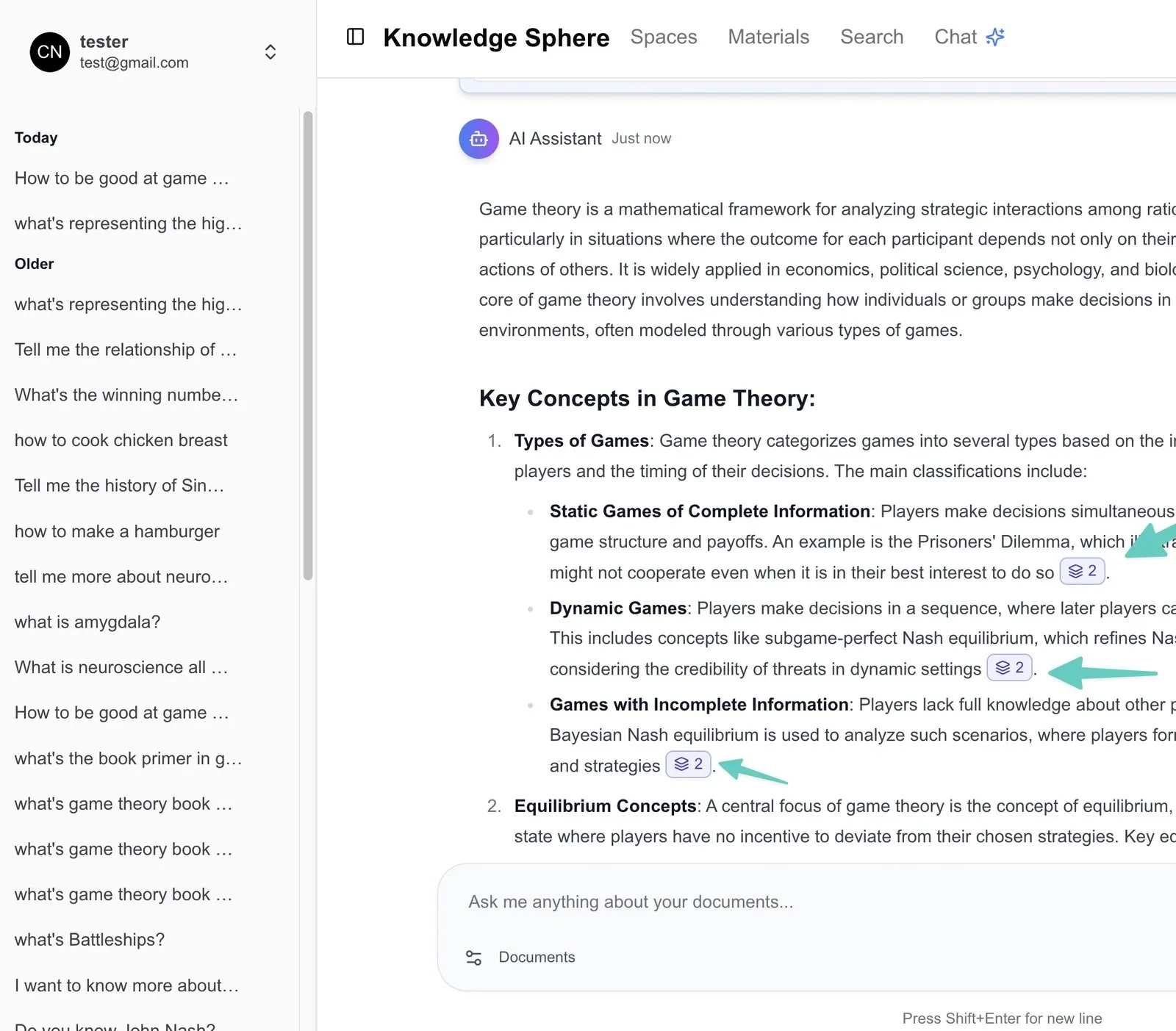
Knowledge Sphere was built to solve this — an AI-driven document-intelligence platform. Users upload documents, ask in natural language, and the AI assistant answers grounded in the content, attaching a traceable source to every sentence. It turns a cabinet of static documents into a knowledge base you can have a conversation with.
Shepherd Tech delivered the full-stack build of this platform, from architecture to launch. Below are its seven core capabilities and the engineering trade-offs behind them.
1. AI chat with inline citations: trustworthy because it is traceable
At the core is an AI assistant that understands your documents:
- Natural-language Q&A: users can ask complex questions about uploaded content; the AI extracts and organises relevant information to answer in real time.
- Conversation memory: the AI remembers earlier questions within a session, keeping context coherent and supporting follow-ups.
- Inline citations: every response sentence carries a citation marker pointing to a specific passage in the documents. This is the bedrock of the product’s trustworthiness — the AI’s answers are not a black box; every sentence can be verified back against the source.
Design stance: augment, don’t replace. The system marks the answer and the evidence chain across vast documents; the final judgement stays with the professional — and the clickable citation is what makes it trustworthy.
2. Smart understanding and summaries: the big picture first, then the detail
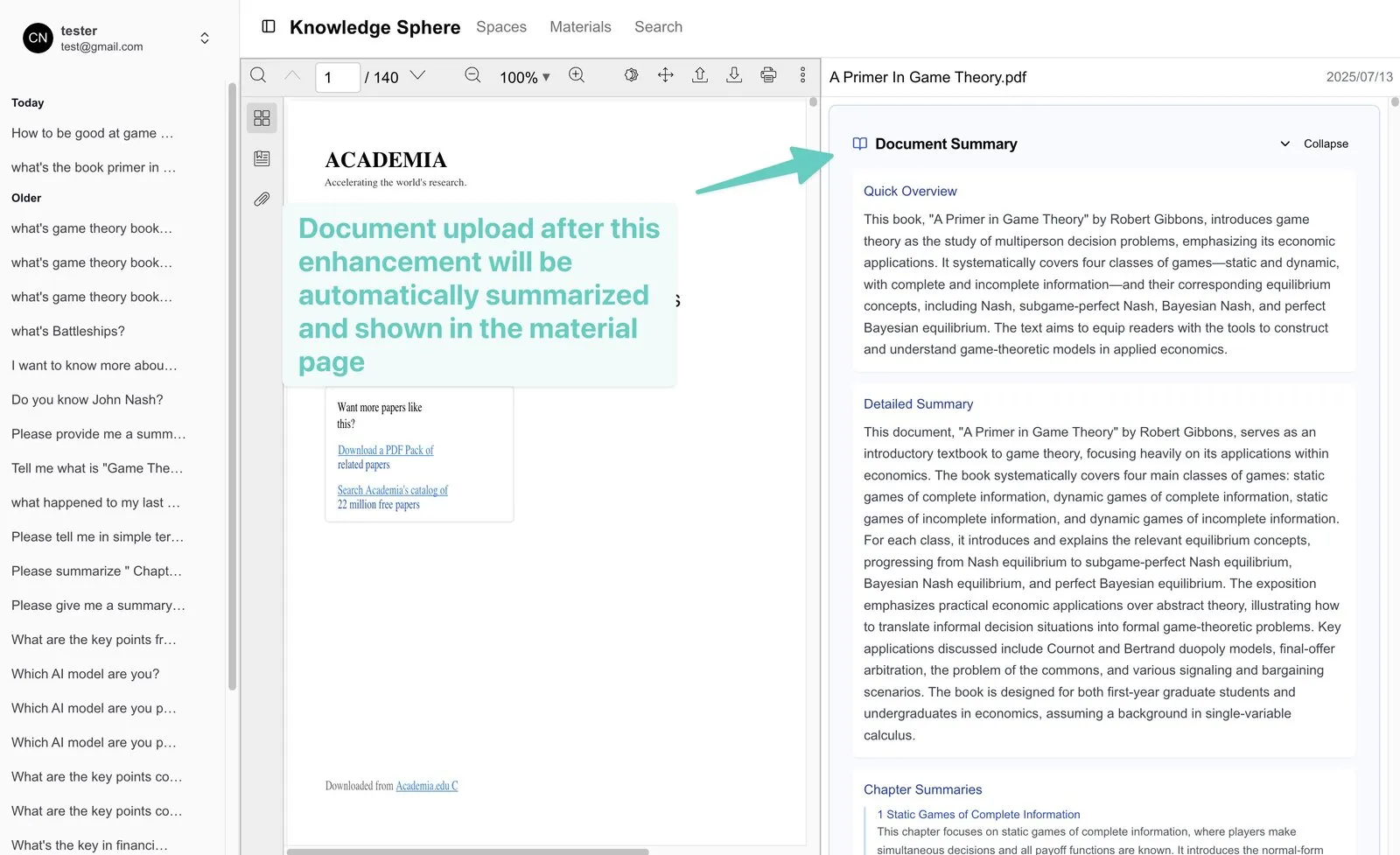
- Automatic summaries: each uploaded document gets multi-level summaries — quick overview, detailed summary, section summaries — so users grasp the whole without reading it all.
- Cross-document analysis: the AI can synthesise information across multiple documents at once, not just a single file.
- Context awareness: the AI considers the full context and intent of a question, not just literal matching.
- Question refinement: when initial retrieval is insufficient, the AI adjusts its strategy and searches again for a more complete answer.
3. The document pipeline: large files and scans, all handled
Accurate Q&A starts with reading documents cleanly and structuring them. The platform builds an enterprise-grade document pipeline:
- High-quality OCR: an enterprise-grade OCR engine handles scanned PDFs, recognising text in photocopied and scanned files with high accuracy.
- Layout understanding: the system recognises headings, paragraphs and tables, preserving the logic of the content rather than flattening a page into a wall of text.
- Structured OCR context: OCR results are structured and attached to the AI’s citations, deepening its understanding of the document.
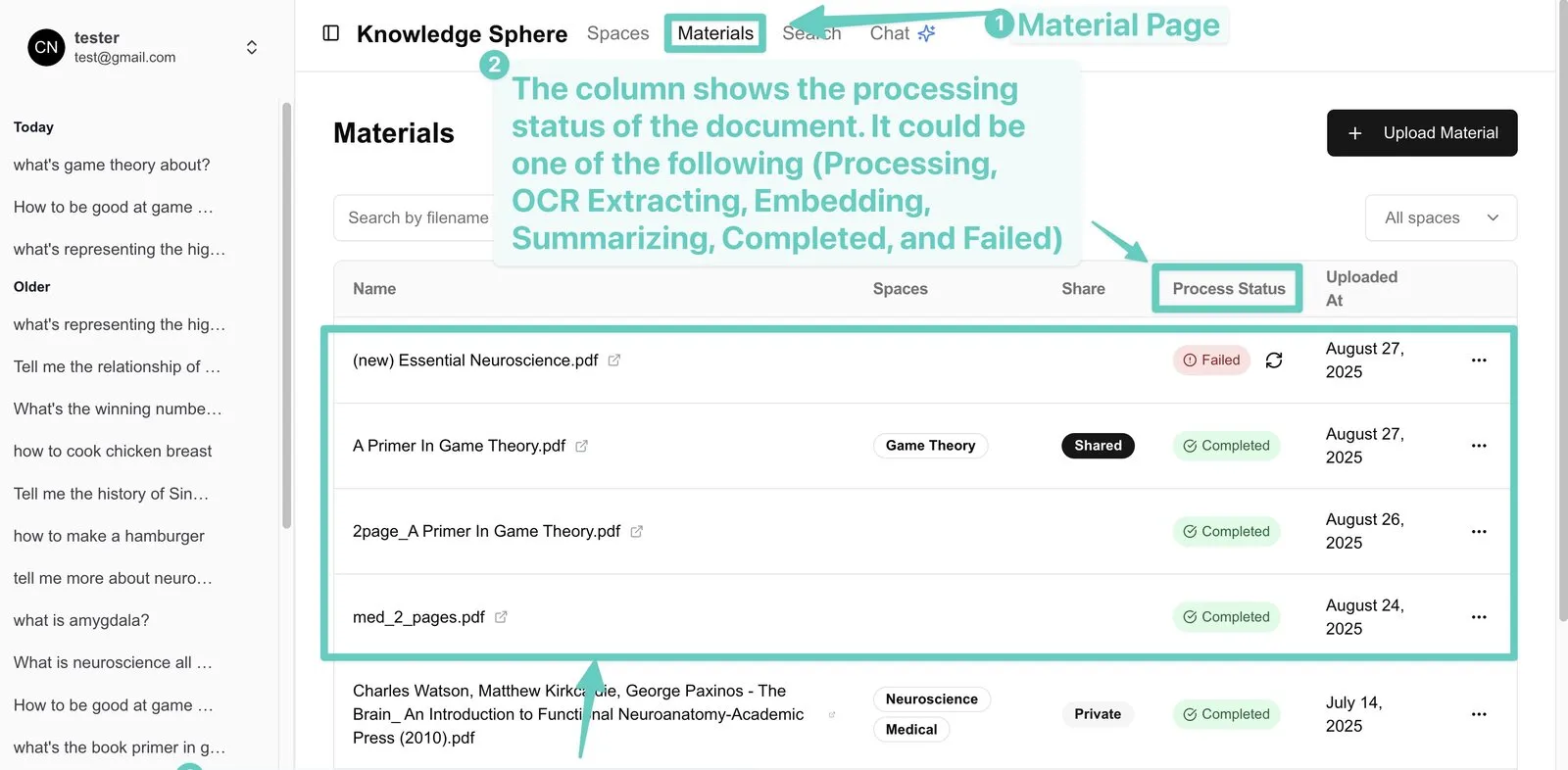
- Async background processing: large files are processed by retryable background jobs so the frontend never blocks; users can keep working and track each file’s status in real time.
- Bulk upload: import and process many documents at once; speed and stability for multi-page documents are specifically optimised.
4. Interactive PDF: from "reading the answer" to "jumping to the source"
This is where Knowledge Sphere most embodies trust — a complete traceable chain from question to source.
Step one: ask a question, get an answer with citations. The user asks in natural language, the AI answers, and each relevant sentence carries a citation marker (e.g. 📄 2) indicating which document and passage it came from.
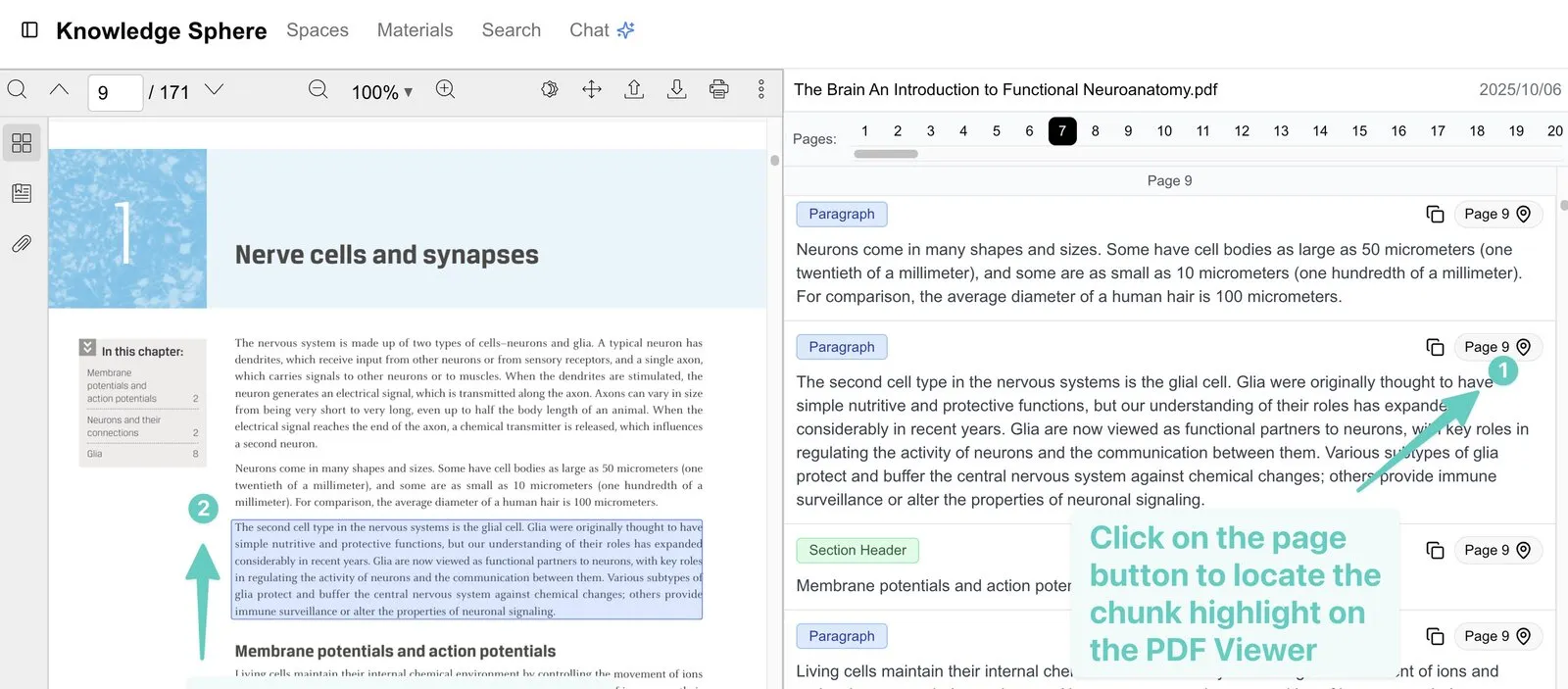
Step two: click a citation to jump to the source and highlight it. When the user clicks a citation marker (or the matching page button), the system flips the PDF to the corresponding page and selects and highlights that passage — almost no gap between answer and source, so users verify on the spot exactly where the AI got it.
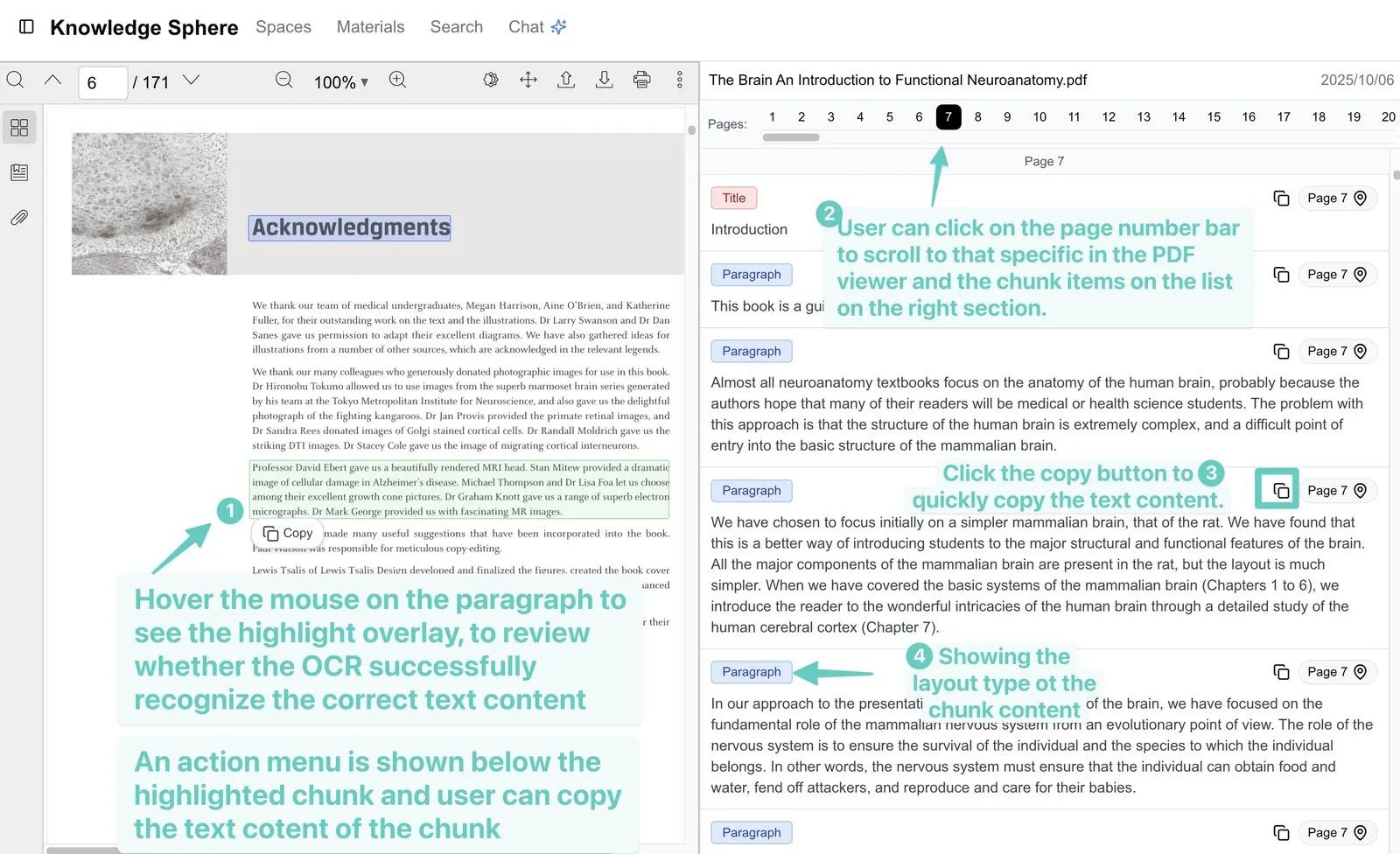
- Text-block highlighting: OCR blocks are colour-coded by extraction confidence, so users see at a glance where recognition is solid.
- Direct copy: copy source text straight from a highlighted block, paired with an inline action menu (copy / search / explain / translate / follow-up).
- Page navigation: jump anywhere in the document from the page bar or the passage list.
5. Smart search: semantic + keyword, hybrid retrieval
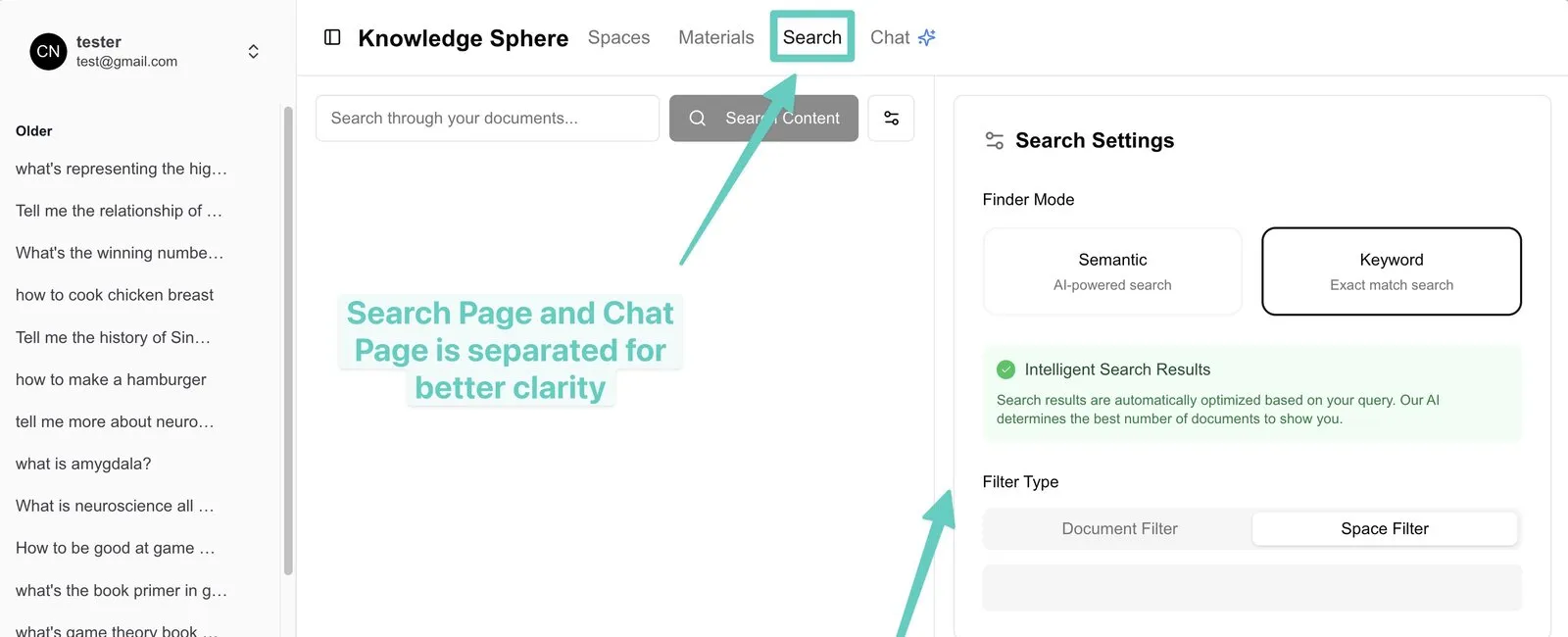
- Semantic search: retrieves on the meaning and intent of the query, not literal matching — even with different wording, close meaning is found.
- Full-text search: keeps traditional exact keyword matching.
- Hybrid search: combines semantic vectors and full-text search, merging their rankings with Reciprocal Rank Fusion (RRF) for the most comprehensive results.
- Scope filtering: search within specific documents or a Space, with results updating live as you type.
6. Team collaboration and permissions: share knowledge, hold the line
- Shared Spaces: group documents by topic into collaborative workspaces for the team.
- Role permissions: tiered Owner and Viewer access.
- Invite-only: members join securely by invite code; only invitees can enter a workspace.
- Document-level permissions and activity tracking: fine-grained control over document access, with tracking of who accessed what.
7. Accounts and security: enterprise-grade data protection
- Complete account system: email-verified sign-up and login, secure password reset, idle auto-logout, profile management.
- Multi-layer access control: permissions at the user, Space and document levels.
- Data isolation: user data is fully separated; passwords are stored hashed with Argon2.
Architecture: a rebuild that cut latency from 20 seconds to 3
Knowledge Sphere’s engineering depth shows most in one key rebuild of the AI agent.
The early platform used a fixed-flow state machine (a fixed seven-step pipeline) — controllable, but with response latency of 15–25 seconds, and only "fake streaming" (computing everything before showing it at once).
We rebuilt it into an autonomous AI agent driven by tool calling:
- The agent decides for itself when to call retrieval tools (passage search / summary search); the prompt offers strategy guidance rather than a forced fixed order — simple questions skip the full seven steps, complex ones get multiple retrieval rounds.
- Response latency dropped from 15–25s to 2–5s, and fake streaming became real token streaming.
- Added hybrid search (vector embeddings + a full-text index + RRF merge) and summary-layer embeddings for sharper retrieval.
Architecture at a glance
- Frontend: an end-to-end type-safe API, with the same TypeScript types shared across front and back end.
- AI agent: true token streaming + autonomous tool calling, wired to large language models.
- Embeddings & retrieval: vector embeddings (1536-dim) + full-text search, merged with Reciprocal Rank Fusion.
- Document processing: enterprise-grade OCR + an async, retryable background pipeline + cloud object storage.
- Data layer: a relational database with a type-safe ORM.
- Identity & security: Argon2 password hashing, multi-layer access control and data isolation.
In closing
Knowledge Sphere is a production-ready AI document-intelligence platform, with every core capability implemented and running — full AI chat with inline citations, the document pipeline, hybrid search, interactive PDF, team collaboration and enterprise security.
It demonstrates Shepherd Tech’s ability to deliver complex AI systems: not just calling an LLM API, but holding the entire RAG chain steady — from retrieval architecture and document pipeline to a traceable product experience.
Have something you want built?
Message us on WhatsApp. For websites we'll build a free demo; for bigger builds we'll scope it with you.